Ever tried using your phone on the TV? The picture gets there — Samsung DeX and an HDMI cable handle that part. The hard part comes next: from ten feet away, a system designed for fingertips simply won't be driven.
Revya TV is the interface that takes over from there. A home screen that speaks arrows, OK and back — you sit on the couch, pick up a remote, and the Galaxy plugged into your monitor or TV finally behaves like a media center.
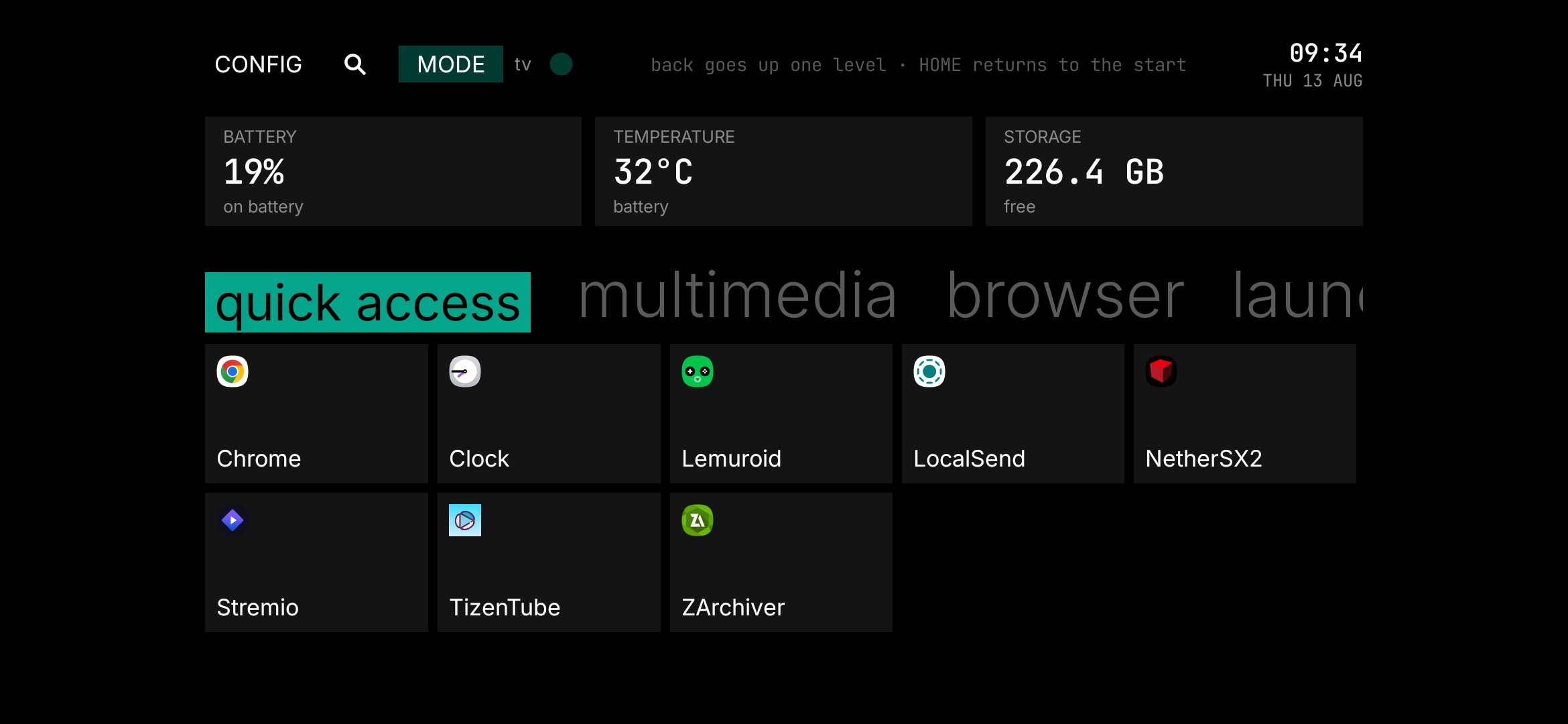
Mirroring your phone to a monitor or a TV is the easy part. The interesting question is the other one: how do you navigate that thing? That's where a phone on the big screen usually falls apart — and exactly where Revya TV comes in.
A gamepad paired over Bluetooth, or the app's virtual remote from your computer: whatever is within reach drives the home screen — no reaching for the phone.
Your video apps open straight from the grid, at TV size. The phone becomes the source; the living room becomes the place to watch.
A section of its own for emulators and ROMs you send over the cable yourself — played from the couch, gamepad in hand.
Photos, videos and files you drag from your computer to the phone, ready to open on the big screen.
Emulators, tools and your own apps grouped into sections — no messy app drawer to scroll through.
Battery, temperature and free space pinned to the top. You always know how your streaming box is doing.
You saw the screen up top, you wanted it, you searched the Play Store — and came up empty. That's on purpose. Revya TV isn't a standalone app: it's the face of a Samsung that became a TV. For the launcher to make sense, the device has to be prepared first: the right apps installed, the system tuned for the big screen, the launcher set as default. Installing just the home screen from a store wouldn't get you any of that.
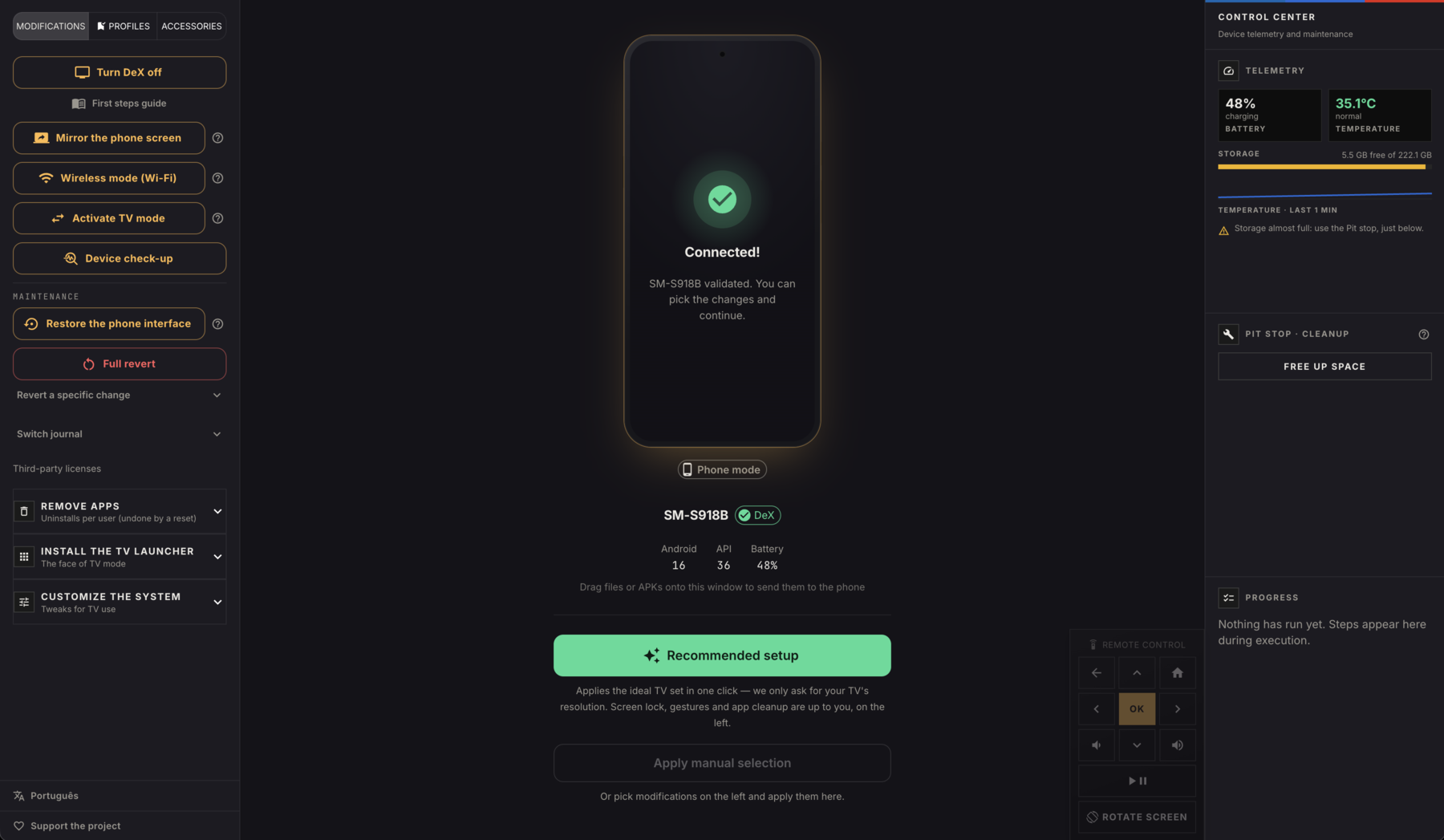
The thing that does that prep — from your computer, over the cable — is the Revya app. It's the bridge between the phone you have today and the streaming box you want.
A real desktop app for Windows, macOS and Linux. Plug the Samsung in over the cable, tick what you want, and watch every step run — verified on the device itself, nothing marked done on faith.
The recommended button applies everything that's safe on any device at once. TV resolution is the only setting it asks about.
Drop it on the window and it goes to the phone over the cable: third-party APKs, ROMs and emulators, photos and videos. Build the TV with your own files.
See the device screen on your computer and drive Revya TV with the virtual remote — without getting up.
Device health, profiles and storage cleanup in one panel — plus a check-up that confirms your settings still hold.
Every change is recorded before it's made. "Full Reversal" gives the phone back exactly as it was — no factory reset.
Runs on your computer and only talks to the phone over the cable. No login, no cloud, no telemetry. Open source.
The heart of the project is the crossing: the same device switches between TV mode and phone mode, as many times as you like, without losing what you customized on either side. It all happens between your computer and your phone, over the cable — about 12 ADB commands per switch, a few seconds each way, logins preserved.
Cable connected, Revya TV as the home screen, streaming and emulators ready for the remote.
One click, or one change at a time, and it's exactly your phone again.
Leave TV mode and the system is snapshotted as you left it — font, launcher, resolution. Come back, and that profile reappears. Same for phone mode. The untouched factory state waits in a third layer for Full Reversal.
TV profile · phone profile · factory stateWith the option on, plugging in the cable re-enters TV mode by itself — the device can live behind your TV. The record follows the factory serial, so it stays valid switching between USB and Wi-Fi.
activates on plug-in · USB or Wi-FiEverything changed is written to disk with atomic writes and automatic backups: a power cut mid-switch can't corrupt the device's record — nothing ends up "half-modified" and unaccounted for.
atomic writes · automatic backupCable in? Media center on the big screen. Want your phone back? "Full Reversal" returns every app and setting exactly as it was — no factory reset. You can even undo a single change at a time.
Only an Android — with real access to its own system through ADB, Google's official debugging tool, the same one developers use everywhere — lets you switch this TV experience on and off whenever you like. No root, nothing locked to anything.
One doesn't exist without the other: Revya TV is the destination, the Revya app is the way there — and the way back, whenever you want your phone again.
The home screen on a remote, with your apps and the device panel. It's the part that makes you want it.
From your computer, it transforms the Samsung, installs the launcher and runs the safe mode switch whenever needed.
The project has reached version 1.0, tested on real devices, and it's open end to end — you can read every line of code, follow development, and convert your Samsung today.
See the project on GitHubSamsung DeX puts the picture on your TV over HDMI — but on its own, it's still a phone on a big screen. Revya applies the system-level changes that finish the transformation, and each one is classified for mode switching: what flips on every crossing and what stays.
They kick in when the phone becomes a TV and go dormant when it's a phone again — the items in the app's Customize system tab, applied and verified one by one on the device:
Made once, they stay whether the device is a TV or a phone — and only leave with Full Reversal. Switching modes uninstalls nothing:
The mode bridge already passes 32 automated checks — customizing both sides, crossing repeatedly, reverting everything, even simulating a power cut or a yanked cable mid-crossing. No obstacle becomes a dead end: it becomes a question with a way back. Version 1.0 had a single priority: proving the bridge is stable in everyday use, on real devices — repeated switches over weeks, logins preserved, auto-bridge on plug-in. Results are still tracked in the open — see the latest tests.
Full transparency on what the program does, what it doesn't, and why it's safe.
Because Revya TV isn't just an app: it's the home screen of a phone that became a TV. For it to work the way it should, the device has to be prepared first — TV apps installed, the system tuned for the big screen, the launcher set as default.
The Revya app does that prep from your computer, over the cable. Installing the launcher alone from a store wouldn't deliver the experience — that's why the path runs through the app.
REVERSIBLENo. Revya doesn't use root and never touches the firmware. Removals are per-user — a standard technique that deletes nothing from the system partition.
Every change is recorded before it's applied, so Full Reversal undoes everything on the spot — no factory reset. You can even undo a single change at a time. You never lose the way back.
NO ROOTNo root, no bootloader unlock, no custom ROM, no firmware changes — so the Knox e-fuse is never tripped. Revya drives everything through ADB, Google's official debugging interface.
The only thing you enable on the phone is USB debugging in Developer options, and the app walks you through it.
DRAG & DROPYes. Beyond the catalog apps, you drag any file onto the app window — third-party APKs, ROMs and emulators, photos and videos — and it pushes them to the phone over the cable.
You install your own apps; Revya doesn't redistribute third-party apps.
OFFLINENo. Revya runs locally on your computer and only talks to the phone over the cable. Apps are installed from offline files bundled with the program — no login, no cloud, no telemetry.
The code is open source: anyone can audit exactly what it does.
Honest answer: it's not factory Android TV — that would mean flashing a different OS, which is risky. What Revya creates is a TV experience on top of the system that's already there: the Revya TV launcher, the right apps, and the settings that make the phone behave like a streaming box.
In practice, on the TV over HDMI with a remote, it feels like a media center — without the risks of touching the firmware.
Any Galaxy with wired video output and Samsung DeX support — most S and Note flagships and some recent A models. The TV connection is a USB-C → HDMI cable or a DeX adapter; no dock required.
OPEN SOURCEFree and open source. No account, no subscription, no ads. It's a project being built in the open — you can follow development, file suggestions and read every line of code.
🤝 SUPPORTIf it put your drawer phone back to work, buying a remote, controller or HDMI hub through the app's accessories tab helps fund development.
The links are affiliate links and cost you nothing extra. Consider it. 🤝